From paper timesheets and Excel lists to a complete time registration with automatic CLA calculations. No hassle, no errors.
Ask any moving company how they track hours and you'll get ten different answers. Timesheets in the cabin. A shared Excel file on the server. WhatsApp messages from the foreman. Or the classic: a stack of work orders that lands on the bookkeeper's desk on Friday afternoon.
It works. Until it doesn't. Because who checks whether those hours match the schedule? Who calculates the overtime surcharge for that Saturday? And who keeps track of which employee is entitled to which allowance?
The real problem isn't the hours themselves
Recording hours isn't that complicated in itself. It gets tricky when you also need to verify, correct, and calculate those hours into surcharges and allowances. The CLA for professional goods transport includes rules for overtime, weekend work, public holidays, and night shifts. On top of that come allowances for accommodation and travel expenses. And each employee may have different arrangements.
When you do this manually, you're not just spending a lot of time - you're also making mistakes. A forgotten overtime surcharge. A miscalculated allowance. An employee who didn't take enough breaks without anyone noticing. These things cost money and create friction with your staff.
"At an average moving company with 15 employees, hours are lost every week on manually processing timesheets and calculating surcharges."
Employees register their own hours via the app
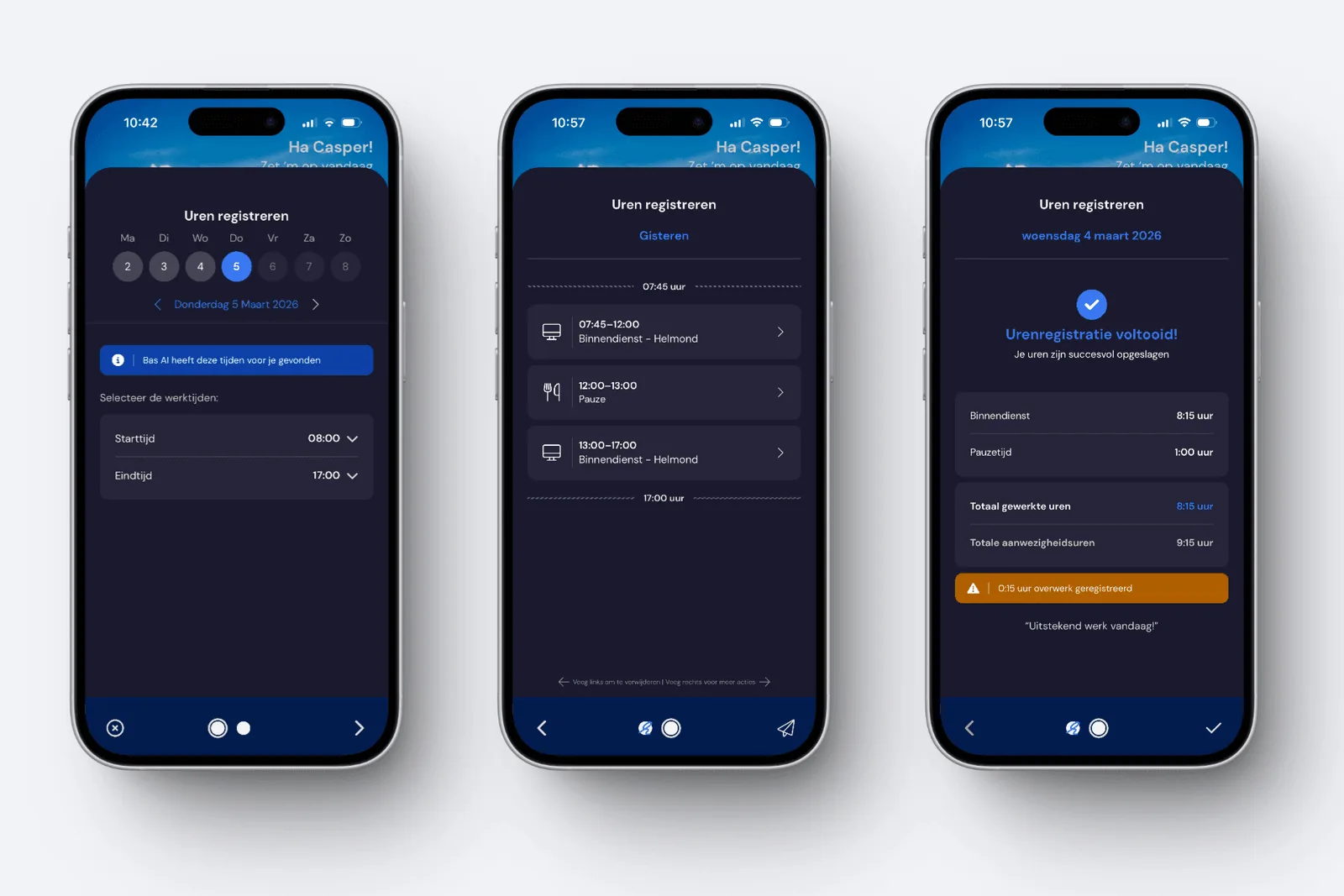
In Bas, time tracking works fundamentally differently. The employee opens the app on their phone and immediately gets a suggestion for the day that needs to be registered. The system knows which hours are expected based on the schedule, contract, and work roster.
The employee only needs to verify if it's correct. Start and end time right? Confirm. Break automatically inserted? Confirm. Done. Did the employee do fieldwork that wasn't on the schedule? Then they add those hours themselves. The registration must be complete - the app won't accept an incomplete day.
In practice, for a scheduled employee it's a matter of three taps on their phone. No forms, no timesheets, no WhatsApp messages to the back office.
The back office gets the complete picture
All registered hours come together in a visual timeline under HRM. You can see per employee and per day exactly what has been registered: working hours, breaks, sick leave, vacation. Each block has a colour indicating its status - from suggestion to approved.
But the system does more than just display. It automatically checks:
- Deviation from contract hours - is an employee structurally working more or less than agreed?
- Break time - does the registered break meet the minimum CLA requirements?
- Comparison with team members - is an employee logging notably different hours than colleagues on the same job?
- Foreman hours - do the hours match what the foreman recorded?
Approval can be done per time block, per employee, or for multiple employees at once. At a moving company with 20 people, daily time processing is handled within a few minutes.
AI does the groundwork
What makes time tracking in Bas special is the smart suggestion that's ready for each employee. The system combines all available information - scheduling, foreman hours, self-registered hours, contract, work roster, and business opening hours - and creates a complete proposal.
Is an employee scheduled for a move from 8:00 to 16:00? Then those hours are already prepared, including the mandatory break at the right moment. Does the employee only have back-office skills and isn't scheduled? Then back-office hours are automatically suggested for the contractual workday.
The result: in many cases, as back office you only need to review the suggestion and approve it. The system has already done the heavy lifting.
From hours to surcharges and allowances
This is where it gets really interesting. Once hours are approved, Bas automatically calculates all surcharges and allowances based on the rules you've set up. Overtime on Tuesday? Surcharge calculated. Move on a public holiday? Holiday surcharge added. Employee worked more than four hours in the field? Accommodation allowance assigned.
You set up the rules yourself through a wizard. The options:
- Surcharge rules - overtime per day or per week, weekend work, public holidays, night work. For each rule you set the percentage and which employees it applies to.
- Allowances - per hour or per day, with conditions. For example: accommodation costs only if an employee works more than four hours in the field and started before 7:00.
- Employee attributes - create attributes and link them to employees to apply specific rules or exclude them.
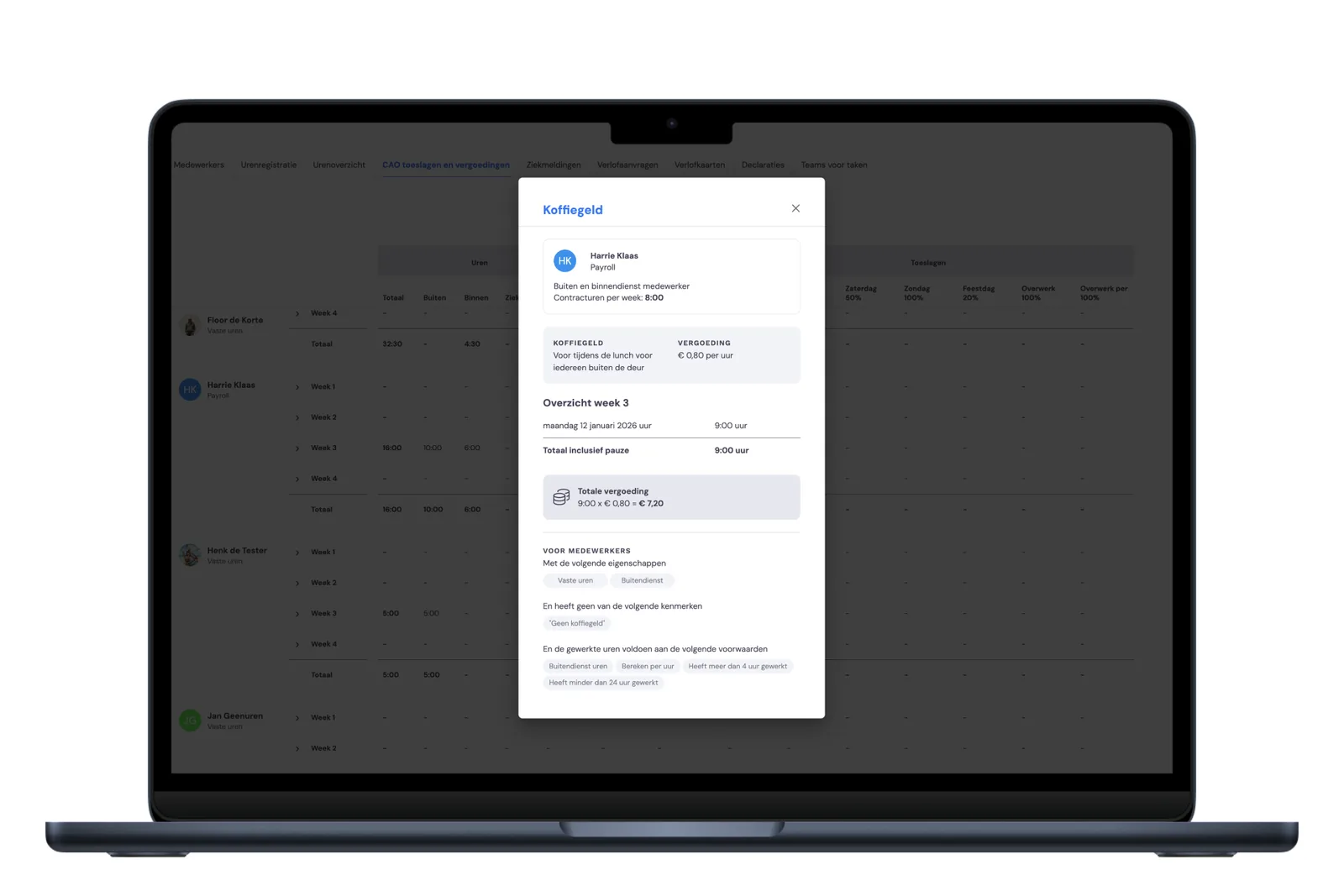
You can follow the standard CLA rules, but also record deviating agreements. Does an employee have the right to extra coffee money based on a previous arrangement? Create an attribute, link the allowance, and it's calculated automatically.
Export to your payroll package
Once all hours are approved and surcharges calculated, you export everything with the press of a button. The export contains hours, surcharges, and allowances per employee - ready to load into your payroll package. No retyping, no manual calculations, no forgotten rules.
The entire process - from client appointment to payroll - runs through one system. That not only saves time, but also prevents the errors that occur when information is entered repeatedly.
"What used to take half a day for time processing and CLA calculations is now a matter of reviewing and approving."
Getting started doesn't have to be complicated
You choose the date you want to start with time registration. This way you can first get the settings in order - break rules, surcharge rules, allowances - and inform your employees about how the app works. From the start date, they automatically receive reminders to register their hours.
The break rules are set by default to the CLA for professional goods transport. Do you deviate? Then adjust the rules to your situation. The same applies to how hours are supplemented: you decide whether and how the system fills in missing hours.
Most moving companies have the setup completed within a morning. And from that moment on, the system works for you instead of the other way around.
Let's have a coffee
Let's discuss how things can be done smarter in your company.
Online or on location - you choose.
Bas Knowledge Base - The new time tracking, CLA surcharges and allowances (help.bas.app).