
By clicking on your photo at the bottom left of the software, you'll go to the profile page.
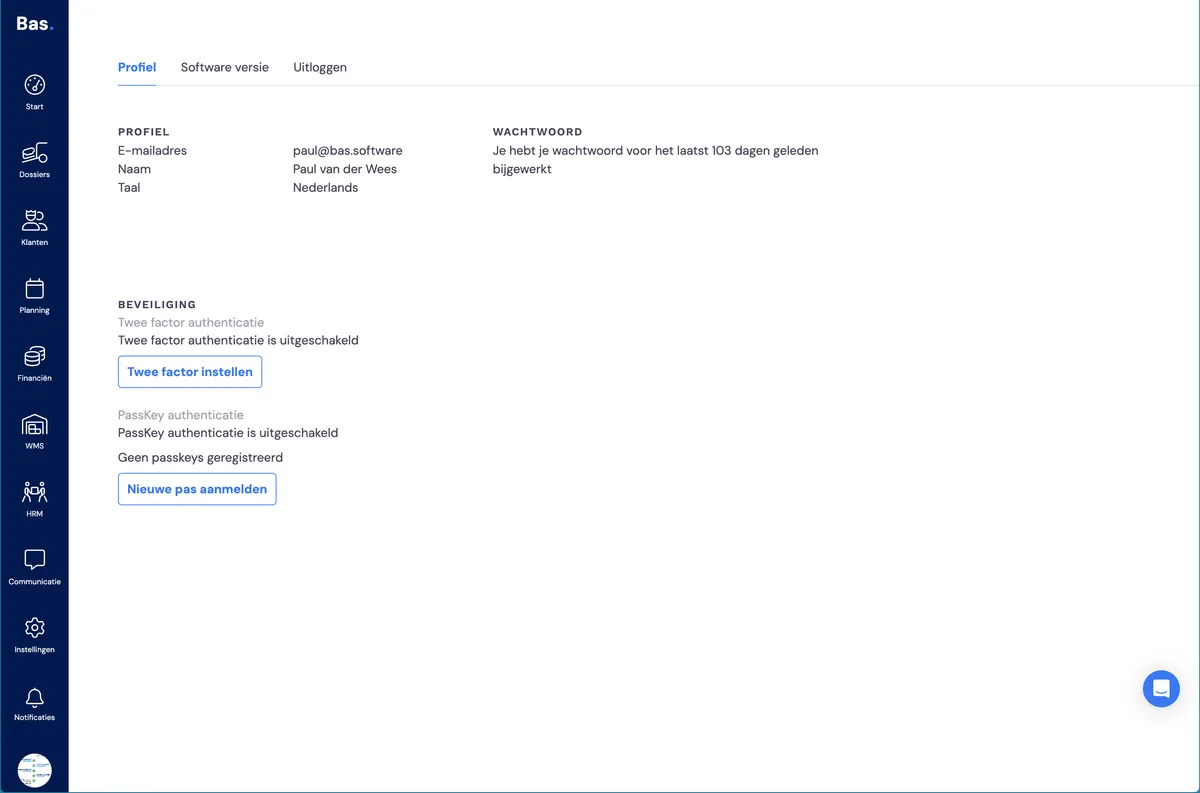
Profile
Under profile, you'll find your personal details. Here you can change your email address, but note that you also log in with this email address, so it's updated automatically.
You can also change your name and language here. Please note: languages are not yet supported in Bas's backoffice.
Password
Here you can change your password. We recommend doing this at least once a quarter.
The password requirements are determined by an external tool and adjusted to external developments. Because these requirements change over time, we can't say exactly which requirements apply at any given moment.
We recommend using a password app such as LastPass and, when creating a password, choosing a minimum length of 15 characters, including symbols, lowercase letters and capital letters.
Security
We also recommend enabling 2FA. This provides better security. Use an authenticator app such as Google Authenticator, Authy, or Microsoft Authenticator.
Passkeys
If your device supports it, you can also use passkeys to log in. This is the safest and most convenient way to access and secure your account.
To set up a passkey for your account, click: Register new passkey. Your password manager will handle the following steps. The steps differ per password manager, so if you have questions about this, it's best to go to the website of your password manager.