
On 17 May around 18:00, an improvement to the planning will be released. Below are the most important changes.
Improved performance
The technology behind the planning has been optimised. This will deliver improved performance! It makes planning smoother and faster.
Better insight into availability
The available hours of permanent employees and of agency workers are now split in the display. This makes it easier to see whether your permanent staff are already reaching their contract hours before you deploy agency workers. The occupancy of vehicles is now also shown in the planning.
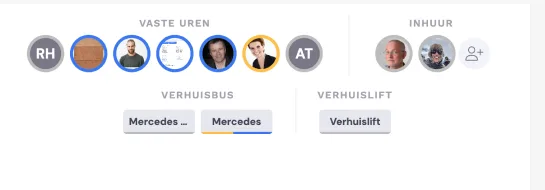
Availability based on the work schedule
The availability as shown in the planning is based on the two-weekly work schedule in HRM. The plannable hours of employees are the number of workable hours plus the standard break, with a maximum of 9.
Leave and sickness integrated into HRM
From now on, you register sickness and leave via HRM; it then appears directly in the planning. This replaces the option of registering it via a double-click in the planning.
Tips for the updated planning
In the previous release, we adjusted the calculation of the capacity of employees and vehicles. In addition to positive feedback about the insights this provides, we've also received a number of questions about it. Here are 2 tips to make good use of this feature.
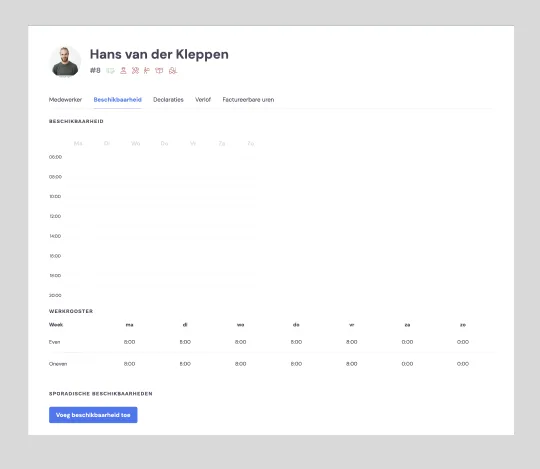
Tip 1: use the work schedule for permanent staff
For employees with a fixed number of hours, it's best to use the work schedule. Enter the number of hours an employee works per day here. Remove the data from the availability.
The capacity in the planning and the number of leave and sickness hours will then be calculated correctly.
Tip 2: use occasional availability for variable employees (agency workers)
If you remove the work schedule and the availability for variable employees and only use the occasional availability, these employees will only appear in the planning when they can actually be scheduled.
The capacity of the vehicles is set to 9 hours by default. This cannot be changed. You can of course still schedule vehicles for longer if you wish.