
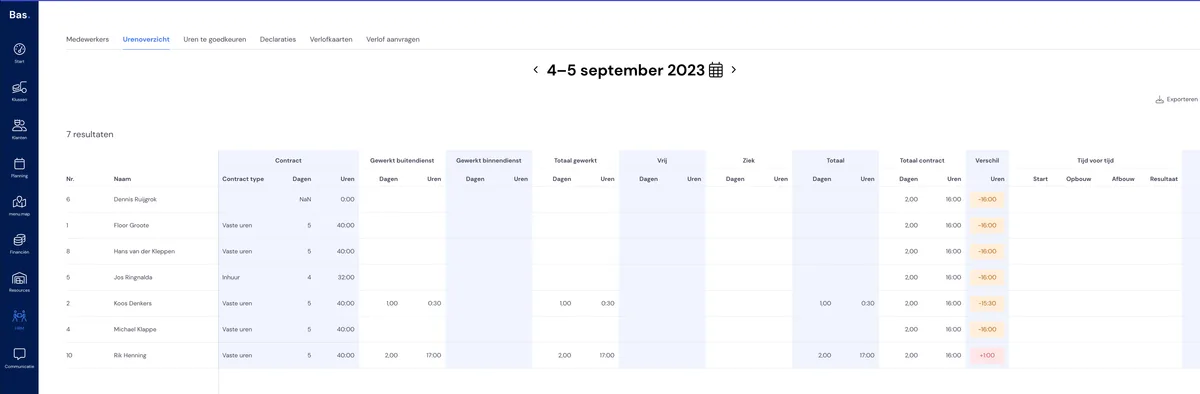
Who said you still had to retype hours into Excel, from a timesheet or from Bas?! With the new hours overview you have all the info you need, right in front of you. And it gets even better — you can even quickly export it to Excel and effortlessly add up hours, calculate averages and carry out all sorts of other calculations!
Want to find out more about the new tables? Click here!
Contract hours
Type of contract? Number of working hours per week? It’s all ready for you straight away.
Field work / office work
Handy, isn’t it — this way you can quickly see how many hours everyone has worked in office work and field work. Later we’ll also use this data for the CLA calculation of the coffee allowance. And you also see the total number of hours worked straight away.
Leave and/or sick leave
Of course, sometimes employees are off or ill. You’ll find these hours simply listed under their own headings. This makes it easy to keep track of how many hours they really worked, were ill, or were absent.
Total contract
We use their schedule (found under their availability) to work out how many hours they should have worked in the period. This can also be done with a fortnightly schedule.
Difference
The system adds up all hours: work, leave and sick leave, and compares this with the contracted hours. You’ll see the difference here. Orange means fewer hours have been recorded, red means overtime and green means spot on.
Time off in lieu and holiday
Right at the bottom you’ll find the 'savings pots' for time off in lieu and holiday days. When an employee has taken holiday or has accrued or used time off in lieu, you’ll see it here. You’ll see the opening balance at the start of the period, any additions and deductions, and finally the closing balance.