
Features and the mobile app
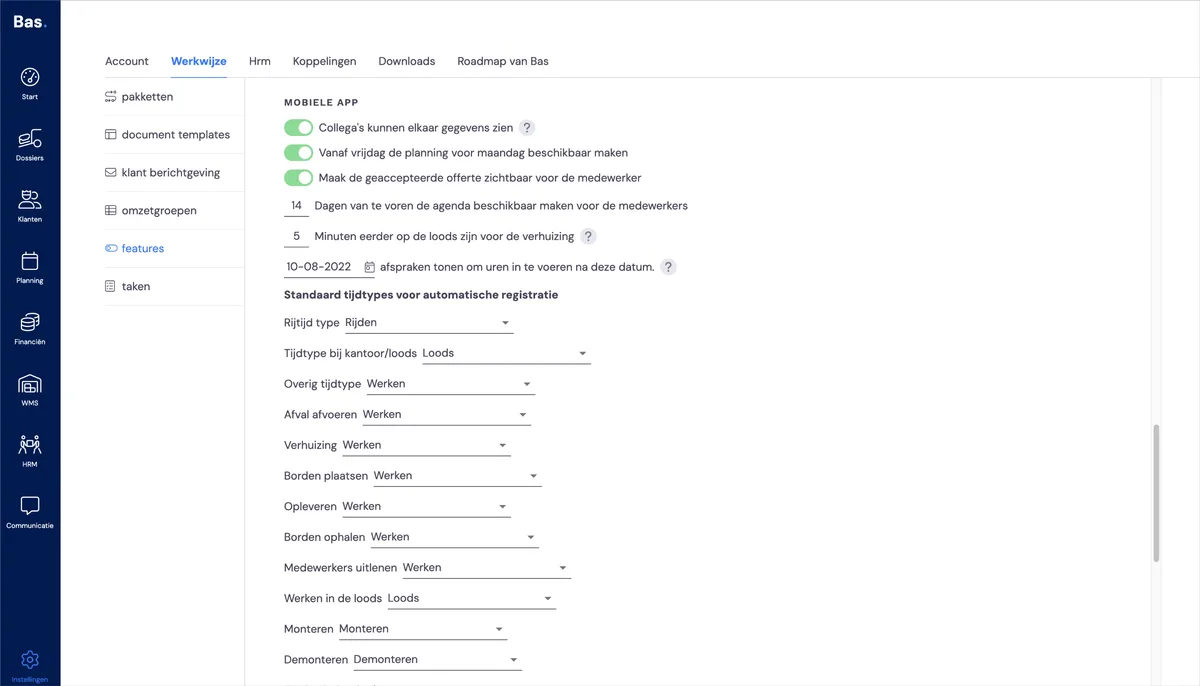
Colleagues can see each other's data
With this privacy setting, you control whether employees can see each other's data. This option is switched off by default.
Make Monday's schedule available from Friday
If you share the schedule one working day in advance, it can be useful to make Monday's schedule available on Friday already. You can do this with this option.
Make the accepted quote visible to the employee
If you enable this option, the quote for the job the employee is going to carry out becomes visible to them. Some customers find this useful, as it gives more insight into the job. The default setting is off.
Make the calendar available to the employee a number of days in advance
This setting determines how many days in advance an employee can see which job they are scheduled for. We recommend setting the number of days to 1 or 2, as the schedule is usually still adjusted a few working days before the job starts.
Minutes to arrive at the warehouse before the removal
This setting determines how much time an employee needs to be at the warehouse before the start of a job, to prepare for it.
Standard trip types
These are the types used when you use automatic time registration.
Next step
Next, you will check the HRM settings and adjust them if necessary. This covers time types for time registration, expense categories for your employees, leave hour types for special leave, maternity leave and public holidays.