
AI proposal based on scheduling or registered hours
To make registering hours easier, the backoffice prepares a proposal for every employee who should be working, based on the data available.
For example, if an employee is scheduled for an appointment, the appointment times are automatically taken over, and the break is added automatically too. Below, you'll see the overview with the proposal for the hours based on the scheduling:
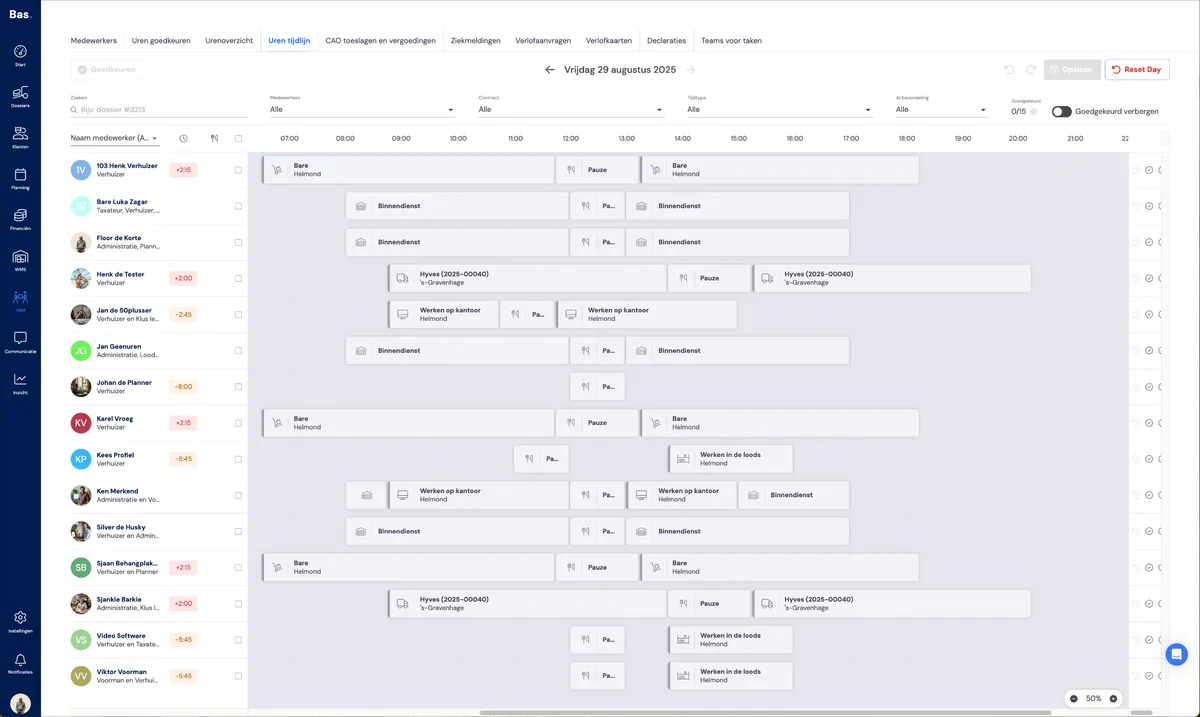
The proposals for the different situations
Different proposals are made for all situations, based on the data available, in the following order:
Foreman hours have been logged for the employee
If an employee is scheduled and the foreman has logged hours, these are taken over.
If the foreman hasn't logged enough hours, these are supplemented based on the rules you've set yourself.
The employee has logged their own hours
If an employee has logged their own hours via the app, these are shown. You only need to check these hours, adjust them if necessary, and then approve them.
If an employee hasn't logged enough hours, these are supplemented based on the rules you've set yourself.
Supplementing hours and inserting a break
If there aren't enough hours in the proposal, these are supplemented based on the rules you've set yourself. For example, if you've set up that for employees with only backoffice skills, all hours to be worked may be supplemented with 'office work hours', this is included in the proposal
If no break has been scheduled or registered, it's included in the proposal. The length of the break, based on the number of hours worked, is placed in the middle of the working day by default.
AI proposal based on contract, work schedule and opening hours
Employee has working times in their profile
If an employee has a permanent contract and working times in their profile, the start time is taken from this and supplemented with the number of hours the employee should work according to the contract
Employee has a completed work schedule
If an employee has a completed work schedule, a proposal is made based on the company's opening hours and the number of working hours
Employee has a permanent contract
If an employee has a permanent contract for 40 hours across 5 days, a proposal is made based on the company's opening hours and the number of working hours per day
Inserting a break
Even if no hours have been logged and there's no scheduling, the mandatory break is still included in the proposal.
Sickness and leave
If sickness or leave has been registered for an employee, this is shown in the hours registration.
Sick or off all day
If sickness or leave has been registered for an employee for the whole day via HRM or via scheduling, this is shown in the hours registration as an hours block for the entire day. This is already approved, and you don't need to change anything further.
If the sick note hasn't been registered correctly, you can add it as a sick note or as leave via the hours registration. The hours are registered immediately, and the leave and sickness are also visible via leave requests and sickness.
Sick or off for part of the day
If an employee is on leave or sick for part of the day, you'll see this reflected in the hours registration. You don't need to do anything with this registration — the hours are registered and approved immediately via the sick note or the leave request.
If the sickness or leave hasn't been registered, you can add it via the hours registration. Here too, a sick note or a leave request is created, which can be found in the employee's details and under leave requests and sickness.
Bank holiday leave
If an employee with a permanent contract would normally work on a weekday, but that particular day is a bank holiday (a weekday according to the work schedule), the employee is given bank holiday leave by default.
If an employee is scheduled to work, it's treated as a normal appointment. (The bank holiday surcharge is calculated according to the CLA.)
Configuring hours registration
You can adjust how the hours registration works to suit your needs, read the article hours registration settings.