
In the new planning, you can work with recurring appointments. In this article, you can read what they are, how to change them on the planning board, and what the difference is between changing one single day and changing the whole series.
What is a recurring appointment?
A recurring appointment is an appointment that keeps returning according to a fixed pattern. For example, every week on the same day, or every Monday and Thursday. You schedule it once, and after that it automatically appears on all subsequent occurrences.
This means you do not have to keep scheduling a regular appointment again and again. Think of a weekly meeting or a recurring job that always falls on the same day.
Changing a recurring appointment on the planning board
On the planning board, you can simply drag a recurring appointment, make it shorter or longer, or move it to another team. By default, only that one day then changes. You will not get a prompt — the change applies to that day immediately.
The rest of the series remains unchanged. On all other days, the appointment is still exactly as it was.
This is useful for exceptions. Does the appointment need to be an hour later just once, or does it need to go to a different team this week? Then you simply change that one day, without having to disrupt the whole series.
Dragging from the appointments panel onto a team
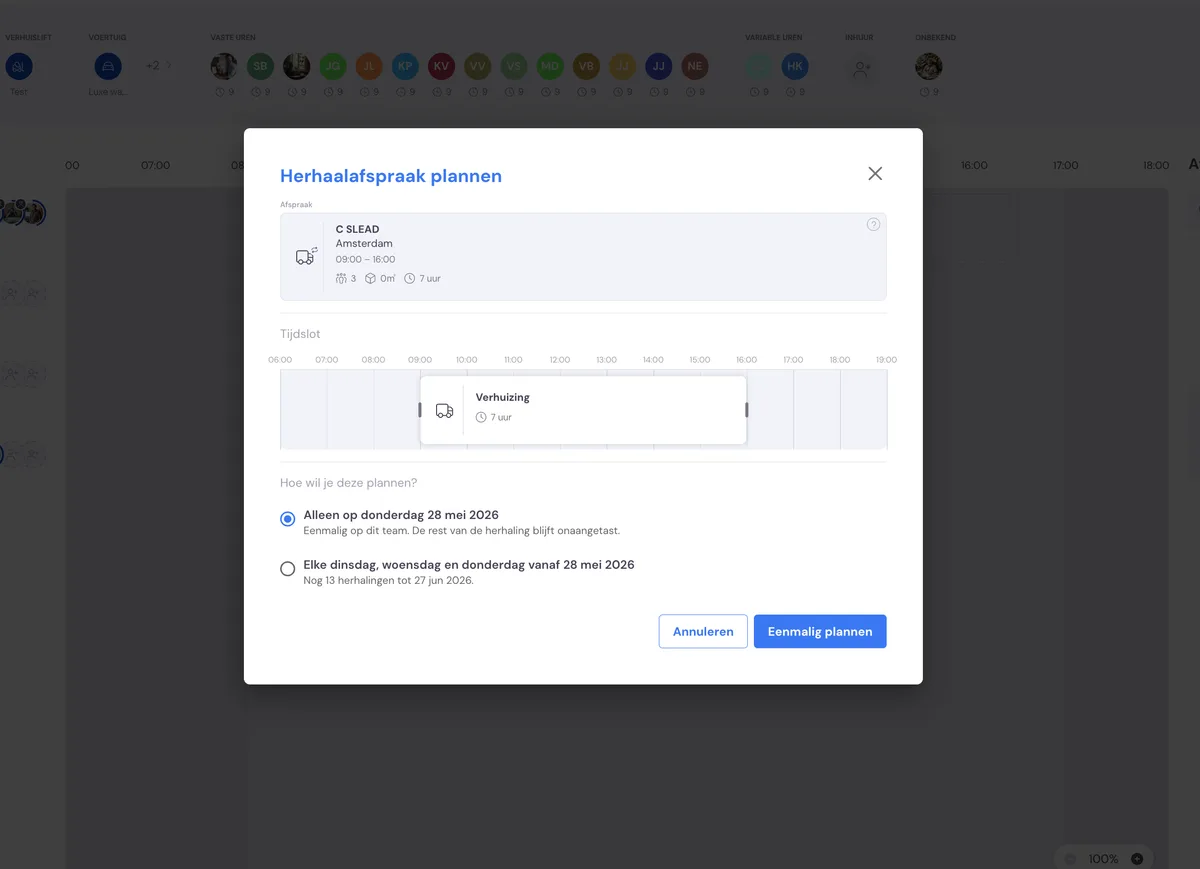
There is one exception. If you drag a recurring appointment from the appointments panel onto a team, a choice dialog first appears asking: "How do you want to schedule this?". You choose from:
Only on {date} — the appointment is scheduled with that team on that one day only. The rest of the series does not change.
Every {weekday} from {date} — from that date onwards, the appointment returns to this team every time, according to the recurrence pattern.
Choose the top option if it is a one-off exception. Choose the bottom option if this appointment should belong to this team from now on.
Changing the whole series
Do you want to change something that applies to every occurrence — for example the set time or the recurrence pattern itself? Then double-click on the appointment and adjust the recurrence pattern.
Here you set how often and on which day(s) the appointment returns. A change to the series applies from that moment to all subsequent occurrences.
A single day versus the series
The difference is important to remember:
If you change something on the planning board for one day, only that day changes. The series stays as it was.
If you adjust the recurrence pattern by double-clicking, the whole series changes from that moment on.
A single change on one day therefore does not affect the series. That is exactly the intention: it makes it easy to make an exception — for example a different time just once — without all the other occurrences changing too.
Read more
More about the new planning: